

mcrypt?is a file encryption method using secure techniques to exchange data. It is required for some web apps for example? Magento , the shopping cart software or a php framework likeLaravel. This tutorial has been tested in OSX 10.10?Yosemite.
This guide is really for users with the version of PHP that shipped with OSX Yosemite which is version 5.5.14. Other downloadable?AMP stacks already have?mcrypt?baked in.
?
Command Line Tools
First up you will need the OSX 10.10 version of?Command Line Tools?which you can download via the Apple available updates in the App store.
Run in the Terminal
xcode-select --install
?
Getting it on in OS X?Yosemite 10.10
This tutorial works mostly in the?Terminal, launch it from /Applications/Utilities, change directory (cd) to the home account and make a directory that you will work in, call it?mcrypt
cd ~ ; mkdir mcrypt ; cd mcrypt
Get?libmcrypt 2.5.8?from Sourceforge,? ?this is direct download link.
Get the?php?code in a?tar.gz or .bz2?format- ?(version?5.5.14 is the one that currently ships with OSX 10.10)
Move both of these files that you downloaded into your working directory –?mcrypt?in this instance, and go back to Terminal
cd ~/mcrypt
Expand both files via the command line or just double click them in the Finder:
tar -zxvf libmcrypt-2.5.8.tar.gz
tar -zxvf?php-5.5.9.tar.gz
Remove the compressed archives
rm *.gz
Any errors on the command line including C++ and g++ mostly are due to the command line tools missing.
?
Configuring libmcrypt
cd?libmcrypt-2.5.8
./configure
make
sudo make install
With the libmcrypt configured and libraries now installed, time for to make the mcrypt extension.
?
?
Install Autoconf
Install? autoconf ?– some more Terminal heavy lifting:
cd ~/mcrypt
curl -O http://ftp.gnu.org/gnu/autoconf/autoconf-latest.tar.gz
tar xvfz autoconf-latest.tar.gz
cd autoconf-2.69/
./configure
make
sudo make install
?
Compile mcrypt php Extension
cd ../php-5.5.9/ext/mcrypt/
/usr/bin/phpize
Output should be similar to:
Configuring for:
PHP Api Version: 20121113
Zend Module Api No: 20121212
Zend Extension Api No: 220121212
./configure
make
sudo make install
The result of this should be similar to:
Installing shared extensions: ?/usr/lib/php/extensions/no-debug-non-zts-20121212/
?
?
Enabling mcrypt.so ?php Extension
Open?/etc/php.ini?and add the line below at the end
extension=mcrypt.so
If there is no?php.ini?file, ?then you need to make one from php.ini.default?in the same location like so:
sudo cp /etc/php.ini.default /etc/php.ini
And allow write capability
sudo chmod u+w ?/etc/php.ini
Then add the line as above in your favourite text editor:
sudo nano /etc/php.ini
or
sudo vi /etc/php.ini
and add in the line:
extension=mcrypt.so
?
Restart Apache
sudo apachectl restart
That’s it, create a php page with the function?phpinfo();??to see if it loaded correctly.

?
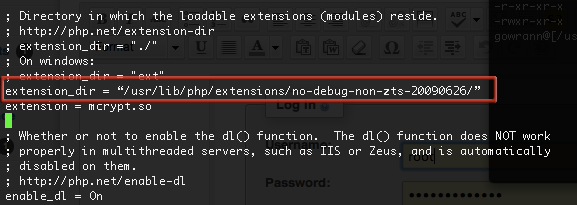
If it didn’t load you may need to declare the extensions directory in /etc/php.ini
extension_dir = "/usr/lib/php/extensions/no-debug-non-zts-20100525/"
?
Hopefully it wasn’t too much of a nightmare…
?

tales-from-the-mcrypt-yosemite-osx-php
?
?
轉自:http://coolestguidesontheplanet.com/install-mcrypt-php-mac-osx-10-10-yosemite-development-server/
?
?
Install mcrypt for php on Mac OSX 10.10 Yosemite for a Development Server
更多文章、技術交流、商務合作、聯系博主
微信掃碼或搜索:z360901061

微信掃一掃加我為好友
QQ號聯系: 360901061
您的支持是博主寫作最大的動力,如果您喜歡我的文章,感覺我的文章對您有幫助,請用微信掃描下面二維碼支持博主2元、5元、10元、20元等您想捐的金額吧,狠狠點擊下面給點支持吧,站長非常感激您!手機微信長按不能支付解決辦法:請將微信支付二維碼保存到相冊,切換到微信,然后點擊微信右上角掃一掃功能,選擇支付二維碼完成支付。
【本文對您有幫助就好】元

